Mercantus Timeworks
Integrations

Make Timeworks part of your existing systems

We have implemented a wide range of integrations with software and hardware. This overview presents examples of our implementations. We also develop new integrations to meet your organization’s needs.

Three connected blue modules illustrate different systems coming together in one solution.

Examples of integrations we have implemented

These examples do not cover all our implementations. The data, workflows and implementation required for each integration are defined with the customer.

Authentication and single sign-on

Single sign-on makes everyday work easier and supports centralized user management. Users do not need separate local usernames or passwords for the booking system.

The same Timeworks solution can support organization-specific SSO and sign-in with Microsoft or Google accounts at the same time. Organizations and tenants of different sizes can use the option that suits them.

Learn more about sign-in optionsShow less

SSO sign-in

Organizations can connect sign-in to their own identity management, such as a Microsoft 365 or Microsoft Entra ID environment.

  • Permissions can be managed centrally according to the organization’s own policies.
  • Additional information, such as a cost center, can be passed through SSO if it is available in the customer’s identity environment.
  • Users can be shown only the spaces, resources and services covered by their booking permissions.

Microsoft or Google sign-in (OAuth)

Tenants, communities and other organizations can sign in using their own Microsoft or Google accounts.

  • Once the organization’s domain is connected to Timeworks, users can sign in with their own accounts and see only the spaces, resources and services authorized for their organization.
  • A practical option for business parks, for example, where users come from several organizations.
  • Individual user roles can be adjusted. However, less information can be transferred than with SSO: this sign-in option does not pass user-specific cost center information.

Suomi.fi authentication can also be added to resident services.

Implementation examples

SSOMicrosoft Entra IDMicrosoft sign-inGoogle sign-inSuomi.fi authentication

Microsoft 365 and Outlook

Timeworks can be connected to a Microsoft 365 environment through an Outlook add-in or an Exchange integration. These approaches can be introduced separately or together according to the organization’s needs.

Learn more about Outlook integrationsShow less

Book spaces and services in Outlook

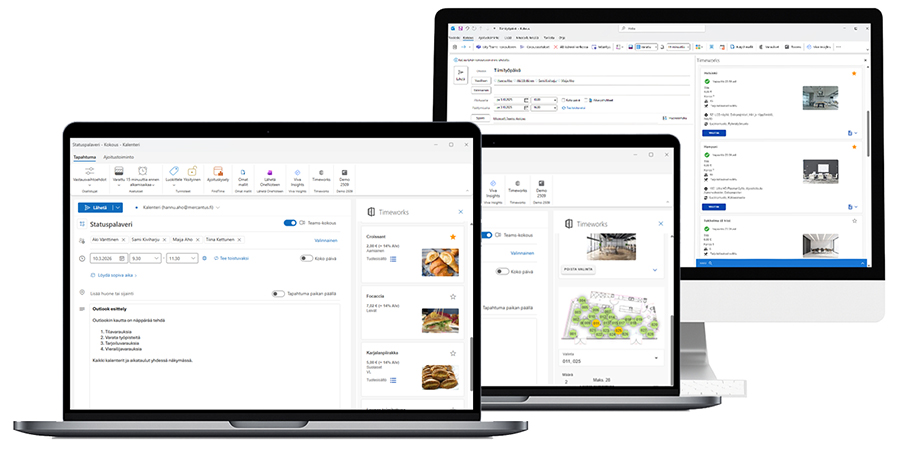
Outlook Add-in brings Timeworks booking functions into Outlook. Book a meeting room and catering while creating a meeting invitation. You can also book workstations and parking spaces and register visitors.

  • Room images, equipment and services help you select a suitable space.
  • Bookable resources and permissions come from Timeworks.

Connect familiar calendar booking to Timeworks

With the Exchange integration, a room is booked by adding it to an Outlook meeting invitation. The booking is transferred to Timeworks, where catering and other services can be added.

  • Booking information flows both ways between Outlook and Timeworks.
  • Booking information supports room displays, reporting and utilization monitoring.
Timeworks Outlook add-in on three computer screens: room selection, a workstation floor plan and catering orders.

Timeworks can also connect to Google calendars.

Implementation examples

Microsoft 365Microsoft OutlookOutlook Add-inExchange / Microsoft Graph APIGoogle calendars

Financial management

We have implemented integrations with several financial management systems. Booking invoicing data can be transferred to financial management as consolidated invoices, for example, combining one organization’s bookings over an agreed period. The data content, transfer method and responsibilities are defined for each customer.

Timeworks also offers its own invoicing and accounts receivable solution for smaller organizations. Invoices can be generated from bookings or created separately without a booking. The invoicing solution is selected according to the organization’s needs.

Implementation examples

CGI RondoRaindancePro EconomicaSarastiaSAPSonetNetvisorFivaldiProcountorFennoaHeerosJeevesWintime

Payment systems

Timeworks has implemented connections to Paytrail, Suomi.fi-maksut and Ceepos payment systems. Integrations can also be implemented with other payment systems. The payment solution is planned according to the services and booking processes your organization uses.

Implementation examples

PaytrailSuomi.fi-maksutCeepos

Access control and locking

Booking information can be connected to electronic locking and access control. Connections have been implemented with systems from Abloy, Bitwards, Fisafe, iLOQ and Livion, among others.

Implementation examples

AbloyBitwardsFisafeiLOQLivion

Information displays and content management

Timeworks provides direct interfaces for information, overview and room displays. Room displays show booking status and, depending on the display, allow bookings. Reception overview displays guide visitors, while a floor display’s map view helps users find an available room or workstation based on real-time booking status. We have also implemented integrations with information display content management systems.

Implementation examples

Room displaysOverview displaysFloor displaysInformation display content management

Reception services and visitor management

Timeworks’ comprehensive integration with Systam Visit visitor management connects booking and visitor information to reception processes.

Mercantus and Systam have a strong partnership and several shared customers. The data exchanged and operating practices are tailored to the needs of each location.

Implementation examples

Systam Visit – automated reception

School, course and sector-specific systems

We have implemented integrations for course management, school administration and other sector-specific systems. Examples include Hellewi, Kurre, Visma InSchool and TASO. Connections are adapted to the systems your organization uses and its data transfer needs.

Implementation examples

HellewiKurreVisma InSchoolTASO

Sales and booking channels

Timeworks can be connected to external sales and booking services. These connections help you offer spaces beyond your own booking service and reach new customers.

Bookings made through a channel can be brought into the solution managed in Timeworks. The data exchanged and operating practices are planned according to the service used and your organization’s needs.

Property management

We have implemented an integration with the Optimaze property management system. The integration’s data content and operating practices are defined according to the use case.

Implementation examples

Optimaze

Sensors and space use

The booking rate shows when a space is reserved. Sensor data adds actual space utilization to reporting, allowing bookings to be compared with actual use.

An unused booking can be released for others based on sensor data and agreed rules.

Implementation examples

IoT sensors

Credit checks and booking terms

Timeworks can be connected to credit information services. The result of a credit check can guide booking terms, confirmation or referral of a booking to administration for review. Automatic notifications to the person handling the booking can be configured for agreed situations.

Connections to other credit information services can also be implemented. The provider, data used in the check and processing rules are defined for each customer.

Implementation examples

Dun & Bradstreet (D&B)

APIs and integration platforms

Timeworks’ documented APIs enable connections to your organization’s other systems. We implement integrations according to your needs, and your own developers or partners can also build connections using our APIs. Systems can be connected directly or through an integration platform.

Implementation examples

Frends integration platformTicketing and point-of-sale systemsCustomer-specific interfaces

Is your system missing from the examples?

Tell us which systems you want to connect and what information needs to flow between them. Let’s plan an integration that meets your organization’s needs.